Happy Earth Day from all of us at ControlTemp Thermostats!
Today is a reminder that we all play a part in protecting our planet. At ControlTemp Thermostats, we believe that energy efficiency isn’t just good for the environment—it’s great for your wallet, too.
To help you celebrate, here are 3 simple tips to optimize your heating and cooling this season:
Ready to maximize your impact? Explore the Eco or Schedule modes on your ControlTemp CT3000 Wi-Fi Thermostat to automate these savings.
Thank you for being a part of our journey toward a more sustainable future.
As summer approaches, ensuring your multi-family properties are equipped for optimal comfort and efficiency is paramount. Proactive HVAC maintenance and smart thermostat utilization not only enhance tenant satisfaction but also significantly reduce operational costs and emergency service calls during peak demand.
Here are key strategies to prepare your properties’ HVAC systems for the summer months:
1. Centralized Thermostat Management & Modernization:
Smart & Programmable Thermostats: Upgrade or ensure your units are equipped with smart or programmable thermostats. These technologies are critical for multi-family efficiency, allowing you to:
* Set efficient schedules tailored to general occupancy patterns.
* Potentially gain centralized control and monitoring capabilities across multiple units.
* Reduce energy waste from constant manual adjustments.
Click here for ControlTemp’s Smart and Programmable Thermostats.
Battery Check: For thermostats relying on batteries, conduct a proactive replacement. This prevents inconvenient outages and ensures consistent operation. Look for the 🔋 icon on your thermostat.
Dust Control: A quick, gentle wipe-down of thermostats in each unit can improve sensor accuracy and overall performance.
2. Optimize Air Filtration Across All Units:
Regular Filter Replacement: This is a cornerstone of efficient HVAC operation. Dirty air filters restrict airflow, forcing systems to work harder, consume more energy, and are a leading cause of preventable breakdowns. Implement a scheduled filter replacement program (every 1-3 months, or as needed) for all units. This improves air quality for tenants and extends equipment lifespan.
3. System Settings & Usage Guidance:
Cooling Mode Activation: Ensure all thermostats are set to cooling mode as warmer temperatures arrive.
Preventing Freezing: Remind tenants of appropriate cooling settings. Excessively low temperatures can lead to the evaporator coil freezing, causing system failure and costly repairs. By using a ControlTemp Thermostat, you can prevent excessive low temperatures with our Minimum Cool Set Point Feature. Click here for our full line of thermostats.
Fan Mode for Circulation: Educate tenants on using the fan mode for air circulation without engaging the compressor, which can help with comfort and energy efficiency.
4. Advanced Features for Property Management:
Wi-Fi Connectivity: For properties with Wi-Fi enabled thermostats 📶, leverage their capabilities. Remote access allows you to monitor usage, adjust settings, and diagnose minor issues from a central location, reducing the need for on-site visits. Click here for our CT3000 Wi-Fi Thermostat.
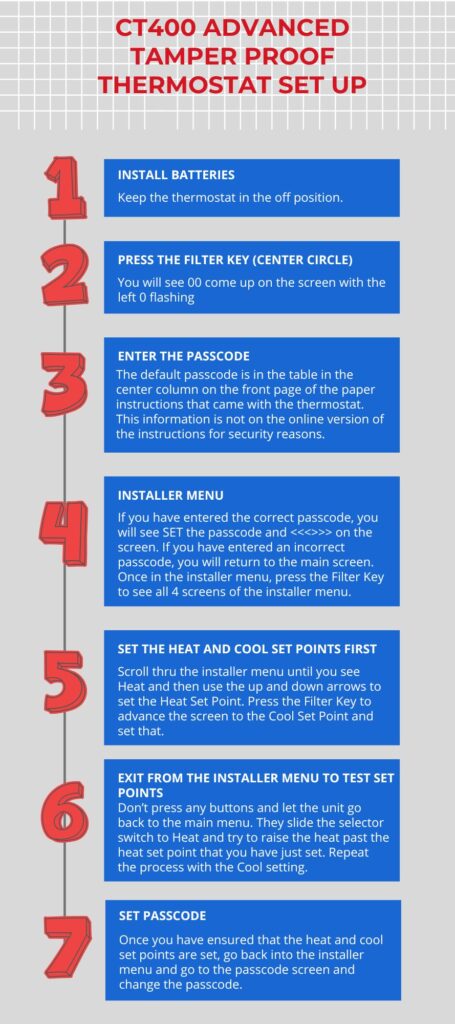
Locking Features for Control: To prevent unauthorized tampering by tenants, utilize the thermostat’s locking feature 🔒. This ensures consistent settings and prevents extreme temperature fluctuations that can lead to high energy bills or system stress. Check out our CT3000 Wi-Fi Thermostat, CT400 Advanced Tamper Proof Thermostats, or our CT2001 Deluxe Tamper Proof Thermostat for their locking capabilities.
ControlTemp Thermostats Solutions: For robust tamper protection and consistent control across your portfolio, consider integrating ControlTemp Tamper Proof Thermostats. These thermostats are designed to give property managers ultimate command over temperature settings, optimizing energy use and reducing tenant-induced maintenance issues. Click here for our full line of thermostats.
5. Professional HVAC Tune-Ups: A Critical Investment:
Pre-Season Servicing: Schedule professional preventative maintenance for all HVAC units across your properties. Technicians can identify and address potential issues before they escalate, ensuring systems operate reliably and efficiently throughout the demanding summer months. This investment minimizes unexpected breakdowns and costly emergency repairs.
By implementing these strategies, you can ensure your multi-family properties remain comfortable, energy-efficient, and well-managed this summer.
Stay cool!

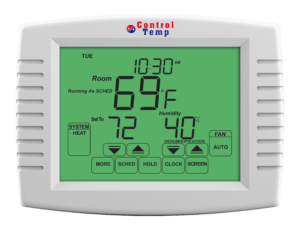
How to program/change the schedule for your CT2001 Deluxe Tamper Proof Thermostat:
1.) This can only be done when the thermostat is in the Unlocked Setting. If the thermostat is not unlocked, you will need to unlock the thermostat. Please consult your Owner’s Manual to unlock your thermostat.
2.) Press “Sched” on the bottom of the screen.
3.) Press “Edit”. You should see “Mon Tue Wed Thu Fri” in the upper left corner of the thermostats. If you do not, press “Prog Day” on the right side of the screen until you see all 5 days listed on the top of the screen.
4.) Press Wake. You will be able to change the time, the heat and cool settings here by using the up and down arrow keys by each option. The fan setting can be programmed to On, Auto, or Circ for each period as well. For more on the Fan Schedule consult your Owner’s Manual.
5.) Press Day to change the next period.
6.) Press Evening to change the next period
7.) Press Sleep to change the next period.
8.) If you do not need all 4 periods, you are able to press “Cancel Period” for any period necessary.
9.) To program “Sat Sun” press “Prog Day” and you will see “Sat Sun” on the top left corner of the thermostat.Â
10.) Repeat Steps 4-7 to program the weekend schedule.
11.) If you need to program a specific day or each day differently, press “Prog Day” until you see the day that you want to program and then repeat steps 4-7 to program each day.
12.) Once you are finished programming the schedule, press Done.
You will see “Running As Sched” above the system box when the thermostats is using the schedule to operate the thermostat.
If you have any questions or concerns, please feel free to reach out to us at info@controltempthermostats.com or at 866-792-2022. Please make sure to have your order information (invoice number/order id) available when contacting us. We do not give out information on the CT2001 unless we can confirm that you are the owner of the thermostat.

Thank you for choosing ControlTemp Thermostats for your heating and cooling needs.
Our thermostats are very easy to install. They use the same wiring configuration as your old thermostat. Below are easy step by step instructions as well as a video on how to install your thermostats.
How do I install my thermostat?
You, your handyman, a licensed HVAC contractor, electrician, or your property management service department can install it according to the instructions provided with the product. We have designed this product for easy installation. Our thermostats install just like a regular thermostat, requiring only the connection of 4-5 wires.
Our Owner’s Manual, which accompanies your unit, includes complete details on how to install and program your thermostat.Â
Step by Step Guide to installing your thermostat:
Installation Video
Want to see a “This Old House” video on how to install your programmable thermostats? Click here
Other Questions
If you have any support questions, please contact us at 866-792-2022 or email us at info@controltempthermostats.com. Please have your order information (invoice number/order id) available when contacting us.